The Complete Digital Art Tools Diploma


Why you should study with us
Includes the following courses:
Digital Art Tools for Photoshop Certificate Level 1 Adobe Illustrator Certificate Level 1 Photoshop CS6 Certificate Making Your Sales Pitch CertificateThe Complete Digital Art Tools Diploma Course
If you want to work in the visual arts, you need to master digital art software. From graphic design to advertising, most creative sectors now rely on digital solutions.
These courses will teach you how to get started with Adobe Photoshop and Adobe Illustrator, setting you on the path to a new career or an enjoyable new hobby. You will learn about the key functions of both packages, how to navigate the interface, how to handle project files and how to use the most common tools.
By the time you have completed all three courses, you will be able to adjust photographs, produce attractive logos and personalise business documents.
What You Will Learn
This combined course includes the following:
- Digital Art Tools For Photoshop Certificate
- Level 1 Adobe Illustrator Certificate
- Level 1 Photoshop CS6 Certification
Digital Art Tools For Photoshop Certificate Course
This course explains how anyone can learn how to use Photoshop, why it has earned a reputation as industry leading software and how its main functions work.
You will learn how Photoshop uses layers to make image editing straightforward. You will also discover how the program can be used to create banners, flyers and other print media.
The course contains 21 videos that take you on a journey through essential Photoshop features. You will learn how to adjust images, handle files, use shortcuts, use the interface and master secondary tools. You will also learn how to use shortcuts, which will help you work quickly and efficiently.
Level 1 Adobe Illustrator Certificate Course
Adobe Illustrator is a popular program that equips you with all the tools you need to create vector-based graphics for use in online and print media.
This course provides an overview of the essential tools and functions you need in order to make the most of this powerful software. You will learn the key differences between Photoshop and Illustrator and why designers often use them both when working on a project.
You will discover how to create a new image and achieve the look you want by using the Spiral Tool, Grid Tool, Paintbrush, 3D effects, gradient effects, and more.
Level 1 Photoshop CS6 Certification Course
This course provides a basic overview of Photoshop’s core features. It will give you a brief overview of what the software can do and its common uses. You will learn how to adjust the canvas size, how to save and retrieve files and how to view your image using different aspect ratios.
This course is the perfect introduction to Photoshop if you need some extra preparation before tackling the Digital Art Tools For Photoshop Certificate. Alternatively, it can be used as a refresher course if you only use Photoshop to make basic image adjustments using the primary tools.
The Benefits Of Our Digital Art Bundle Course
- These courses will help you identify and use the main features within Photoshop and Illustrator
- It is the perfect bundle if you want to tackle a more creative role at work – these skills are useful for web design, logo design and updating company literature and stationery
- This software will also help you create memorable content that will enhance your marketing and social media presence
- These courses will give you the confidence to move towards a career in the creative sector, or simply add a new dimension to your personal projects
This course includes
24/7 Student Support
End of course certification
Lifetime access to your course
This is a bundle course, and contains the following courses:
Digital Art Tools for Photoshop Certificate Course
Ever wonder why a picture in a magazine looks flawless or how creative an advertising banner looks? While being a professional designer or photographer may have a lot to do with it, the potential to create amazing images is possible for anyone. The key is to learn how to use the right post-production software, such as Adobe Photoshop. The ability to create multi-layers with unique effects and designs allows the designer to add depth and dimension. It is important to understand what Photoshop is used for as it has multiple functions and can be a very useful tool in not just editing photos, but also creating pamphlets, banners, business cards and flyers.
This course will teach you about the benefits of such a program and also provides instructions on how to use it for both professional and personal needs. Throughout the course, you will see 21 different videos. Each video will take you on a step-by-step journey through the basic features of Photoshop. While there are several obvious features, such as the ‘Layers’ dialogue box, there are additional ways to use each tool to maximise the post effects of a photo.
In this course, you will learn:
- How to create a new file and adjust a canvas size that is suitable to project needs
- How to navigate through the software, where to find its tools and understand the layout of the page
- Learn how to identify Photoshop tools and understand their basic functionalities
- Learn how to identify the secondary tools, how to select them and what they are used for
- Learn shortcuts and understand how and when to use them
- How to use the layer option and understand the layer dialogue box
- Learn how to use and apply adjustment layers
- How to add effects and filter to an existing image
Course Benefits:
- You will learn the basic steps of using Photoshop and can begin to create a design
- How to become more efficient by using shortcuts and understanding the use of specific tools
- You will understand how to enhance an image and ways to crop the image to reuse for another project
- The importance of colours and how they can be adjusted and enhanced using the different colour options such as colour balance
- How to use brightness and contrast, exposure and hue and saturation to manipulate a photo
- How to use rulers to make creative designs such as pamphlets
- Design elements that enhance a creative project
Level 1 Adobe Illustrator Certificate Course
Adobe Illustrator is a flexible and user-friendly new software that allows you to create attractive designs and images using vector graphics. In addition, it allows you to create small image file sizes - as opposed to other graphics design software, where file sizes are enormous - and print them out in high quality.
If you’re just starting out, this video course on Adobe Illustrator shows you how to use the tools and introduces different features that you can use, to create magnificent designs.
One of the most useful points is that Adobe Illustrator offers compatibility with other Adobe products and integrates with interfaces, such as Adobe After Effects.
In this course, you will learn:
This course on Illustrator covers the following topics:
- The fundamental differences between Adobe Photoshop and Illustrator, and how each graphic interface works;
- How to open different types of new files for different requirements;
- The icons, elements and features on the Illustrator home page, and how to access each one;
- The features and benefits of using the Pen tool, and how you can use it, to create new designs, by creating pivot points, etc.;
- Using the Line Segment, Spiral and Grid tools, to build an image;
- An introduction to shape tools, and how to use them;
- How to manipulate the Paintbrush and Colour features, to obtain the desired effects, including 3D and gradient effects;
- How to use the Scale, Rotate, Reflect and Width tools, to create the designs that you want;
- How to use and manipulate layers, to insert different elements into your final design;
- How to use the Shape Builder and Free Transform tools, to give your image the final touches and fine-tune it.
Course Benefits:
The benefits of studying this course on Illustrator include:
- You will be able to use the tools and features, to create drawings, designs and logos for both personal and professional use;
- You will be able to create attractive and aesthetic information graphics and resize every design to your requirements;
- You will be able to use vector graphics, to create trace drawings and maps.
Level 1 Photoshop CS6 Certificate Course
Photoshop is an excellent tool for taking an image to the next level. It elevate the quality of a photo and can completely change an image.
However, before you can learn all the advanced tricks-of-the-trade, it’s essential to understand Photoshop’s basic and most commonly used tools. Not only does this allow for proper application of tools, but its benefits span across many industries.
Photoshop is great for creating website layouts and graphics, restoring old images and artistically transforming an image.
Whether you’re a professional designer or simply into editing selfies, the creative possibilities with Photoshop are endless. Let’s look at what you will learn in this course and what some of the benefits are.
What you will learn in this course:
- How to express yourself creatively using Photoshop
- What to do with an image once editing is finished
- The different ways to enhance a photo and learn about the basic tools of Photoshop
- How to view different aspect ratios
- How to apply overlays
- About the setting options of the gear tool
- The difference between print and web options
- How to personalise personal and business documents
- Understand about different file types and how to import an image
- You will understand the importance of file size, image size and canvas size
Course Benefits:
- Enhances career options
- Learn how to effectively use layers
- Learn about the benefits of the different file types
- Understand which file type is most commonly used
- Know how to enhance photos using the spot healing brush and clone stamp tool
- Excellent tool for business as it is a commonly used platform for editing, marketing and creating business cards
Making Your Sales Pitch Certificate Course
To persuade a prospective client to make a purchase, you need to make a convincing sales pitch. Your success will depend on your ability to understand your customer’s needs, communicate your message and appear confident at all times.
This course will teach you how to put together a compelling pitch that will help you build a strong rapport with a prospect and close the deal. It takes you step-by-step through the planning process so you can feel confident when making a pitch.
You Will Learn:
- Why it’s normal to feel anxious prior to making a sales pitch and the five steps you should take to ensure you are well-prepared
- How to speak and stand in a way that conveys quiet confidence and authority
- What to do if you make a mistake during your sales pitch
- The five most common mistakes people make when giving a sales pitch and how to overcome them
- Why it is important to get feedback on your pitch and why it’s a good idea to watch other people make sales pitches
Benefits of Taking This Course:
- This course will help you make convincing sales pitches that will give you a better chance of closing a deal
- This course will teach you what makes for a weak and strong sales pitch, and will therefore enable you to give meaningful feedback to colleagues who ask for your opinion on their selling skills
- This course will improve your public speaking abilities, which in turn will improve your confidence and make you a more persuasive sales person
- This course will teach you a number of transferable communication skills, which will be useful in both your professional and personal life
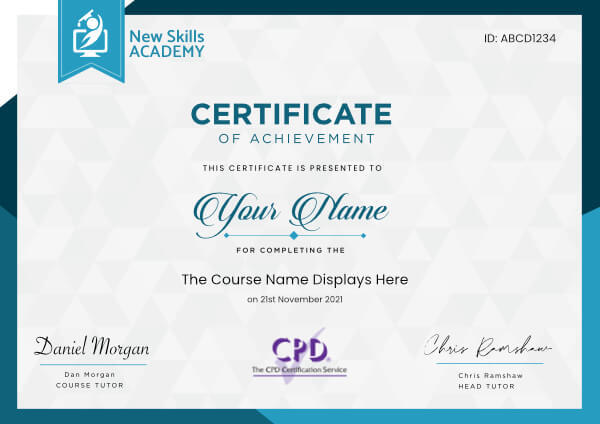
 ID: YDFT67YHJ
of achievement
This certificate is presented to
Your Name

For completing the
The Complete Digital Art Tools Diploma
on 21st November 2026
Selena Hurford
Selena Hurford
Course Tutor

Daniel Morgan
Daniel Morgan
Head of Academy
Anyone who has an interest in learning more about this subject matter is encouraged to take the course. There are no entry requirements to take the course.
The course is broken down into 0 individual modules. Each module takes between 20 and 90 minutes on average to study. Although you are free to spend as much or as little time as you feel necessary on each module, simply log in and out of the course at your convenience.
You can study the course any time you like. Simply log in and out of the web based course as often as you require. The course is compatible with all computers, tablet devices and smart phones so you can even study while on the move!
Once you have completed all 0 modules there is a multiple choice test. The questions will be on a range of topics found within the 0 modules. The test, like the course, is online and can be taken a time and location of your choosing.
The pass mark for the test is 70%.
If you don’t pass the test first time you will get further opportunities to take the test again after extra study. There are no limits to the number of times you can take the test. All test retakes are included within the price of the course.
You can either use your Visa, MasterCard, American Express, Solo cards or PayPal account to pay for the online course. Our site uses the latest SSL encryption to ensure your safety. All payments are handled securely by PayPal.
You can begin the course immediately after your payment has been received. You will create your login details during the checkout process. We will also send you an email confirming your login details.
We estimate that the course will take about 9 hours to complete in total, plus an additional 30 minutes for the end of course test.
Once you have been awarded your certificate it is valid for life. The certificate does not expire or need renewing.
A great course to reinforce the knowledge I have gained through on-the-job experience. Now I have the confidence in my experience to apply for better jobs to utilise my newly learned skills. Being able to complete the course at my own speed and when convenient was great and suited my situation. Also being able to review the modules as I was progressing really helped it sink in thoroughly. I would strongly recommend this course to anyone who has an interest in HR, any section of the arena, either to learn, to brush up on existing knowledge or like me, to be able to prove that I know the basics of the HR function.

Jo Kesbey
I think the Admin and PA Diploma course is absolutely terrific. It gives candidates the chance to develop their skills in the PA and Administration field along with gaining some valuable personal skills along the way. It has given me the boost that I needed to be considered for different job roles in the Administration field and without this my CV would not look as good to potential employers. Giving people the chance to succeed at something they really want to be a part of makes this course brilliant in every way. The layout of each module is set out superbly !
Ashliegh Bell
Very informative and interesting to read. Having it broken down into very manageable sections makes it easy to absorb your new found knowledge.

Kathleen Walker
This course was super fun and so easy to follow.
I loved the convenience of learning everywhere, I could use my phone or tablet and do the course in the car, breaks while at work or in the privacy of my living room. The videos were wonderful and the worksheets helped so much as well... I'm more confident in myself now :)

Tara Ireland
Very nice and practical. Good course structure comes with handout. Each module contains down-to-earth content which provide a comprehensive knowledge from learning about this industry, getting to know the florist and the basic understanding about flowers, then to how to start and maintain our own business.
With the completed course which does provide me clear guidelines to enter this industry and knowing what’s in front of me.
The hand out does help a lot too. I can decide freely when to learn and the learning pace by my own. Through this course, I’ve also established a solid knowledge about techniques of how to take care of flowers correctly, how to design and create my own bouquet.
Overall, I am very satisfied.

Cynthia Huang
An excellent course with up to date thinking based on good research about canine behaviours. I particularly liked the style of teaching. Suitable for all levels and had just the right touch.
I found it stimulating, encouraging and above all, not patronising. It will be very helpful to me on my road as an animal Reiki therapist working with a wide variety of breeds in a rescue centre. I am now much more aware of calming signals and subtle signals that the dog is ready to accept contact.
I would recommend it to anyone wanting to enhance their understanding and communication with dogs.
Lucy Lofting
The Complete Digital Art Tools Diploma Course
If you want to work in the visual arts, you need to master digital art software. From graphic design to advertising, most creative sectors now rely on digital solutions.
These courses will teach you how to get started with Adobe Photoshop and Adobe Illustrator, setting you on the path to a new career or an enjoyable new hobby. You will learn about the key functions of both packages, how to navigate the interface, how to handle project files and how to use the most common tools.
By the time you have completed all three courses, you will be able to adjust photographs, produce attractive logos and personalise business documents.
What You Will Learn
This combined course includes the following:
- Digital Art Tools For Photoshop Certificate
- Level 1 Adobe Illustrator Certificate
- Level 1 Photoshop CS6 Certification
Digital Art Tools For Photoshop Certificate Course
This course explains how anyone can learn how to use Photoshop, why it has earned a reputation as industry leading software and how its main functions work.
You will learn how Photoshop uses layers to make image editing straightforward. You will also discover how the program can be used to create banners, flyers and other print media.
The course contains 21 videos that take you on a journey through essential Photoshop features. You will learn how to adjust images, handle files, use shortcuts, use the interface and master secondary tools. You will also learn how to use shortcuts, which will help you work quickly and efficiently.
Level 1 Adobe Illustrator Certificate Course
Adobe Illustrator is a popular program that equips you with all the tools you need to create vector-based graphics for use in online and print media.
This course provides an overview of the essential tools and functions you need in order to make the most of this powerful software. You will learn the key differences between Photoshop and Illustrator and why designers often use them both when working on a project.
You will discover how to create a new image and achieve the look you want by using the Spiral Tool, Grid Tool, Paintbrush, 3D effects, gradient effects, and more.
Level 1 Photoshop CS6 Certification Course
This course provides a basic overview of Photoshop’s core features. It will give you a brief overview of what the software can do and its common uses. You will learn how to adjust the canvas size, how to save and retrieve files and how to view your image using different aspect ratios.
This course is the perfect introduction to Photoshop if you need some extra preparation before tackling the Digital Art Tools For Photoshop Certificate. Alternatively, it can be used as a refresher course if you only use Photoshop to make basic image adjustments using the primary tools.
The Benefits Of Our Digital Art Bundle Course
- These courses will help you identify and use the main features within Photoshop and Illustrator
- It is the perfect bundle if you want to tackle a more creative role at work – these skills are useful for web design, logo design and updating company literature and stationery
- This software will also help you create memorable content that will enhance your marketing and social media presence
- These courses will give you the confidence to move towards a career in the creative sector, or simply add a new dimension to your personal projects
This course includes
24/7 Student Support
End of course certification
Lifetime access to your course
This is a bundle course, and contains the following courses:
Digital Art Tools for Photoshop Certificate Course
Ever wonder why a picture in a magazine looks flawless or how creative an advertising banner looks? While being a professional designer or photographer may have a lot to do with it, the potential to create amazing images is possible for anyone. The key is to learn how to use the right post-production software, such as Adobe Photoshop. The ability to create multi-layers with unique effects and designs allows the designer to add depth and dimension. It is important to understand what Photoshop is used for as it has multiple functions and can be a very useful tool in not just editing photos, but also creating pamphlets, banners, business cards and flyers.
This course will teach you about the benefits of such a program and also provides instructions on how to use it for both professional and personal needs. Throughout the course, you will see 21 different videos. Each video will take you on a step-by-step journey through the basic features of Photoshop. While there are several obvious features, such as the ‘Layers’ dialogue box, there are additional ways to use each tool to maximise the post effects of a photo.
In this course, you will learn:
- How to create a new file and adjust a canvas size that is suitable to project needs
- How to navigate through the software, where to find its tools and understand the layout of the page
- Learn how to identify Photoshop tools and understand their basic functionalities
- Learn how to identify the secondary tools, how to select them and what they are used for
- Learn shortcuts and understand how and when to use them
- How to use the layer option and understand the layer dialogue box
- Learn how to use and apply adjustment layers
- How to add effects and filter to an existing image
Course Benefits:
- You will learn the basic steps of using Photoshop and can begin to create a design
- How to become more efficient by using shortcuts and understanding the use of specific tools
- You will understand how to enhance an image and ways to crop the image to reuse for another project
- The importance of colours and how they can be adjusted and enhanced using the different colour options such as colour balance
- How to use brightness and contrast, exposure and hue and saturation to manipulate a photo
- How to use rulers to make creative designs such as pamphlets
- Design elements that enhance a creative project
Level 1 Adobe Illustrator Certificate Course
Adobe Illustrator is a flexible and user-friendly new software that allows you to create attractive designs and images using vector graphics. In addition, it allows you to create small image file sizes - as opposed to other graphics design software, where file sizes are enormous - and print them out in high quality.
If you’re just starting out, this video course on Adobe Illustrator shows you how to use the tools and introduces different features that you can use, to create magnificent designs.
One of the most useful points is that Adobe Illustrator offers compatibility with other Adobe products and integrates with interfaces, such as Adobe After Effects.
In this course, you will learn:
This course on Illustrator covers the following topics:
- The fundamental differences between Adobe Photoshop and Illustrator, and how each graphic interface works;
- How to open different types of new files for different requirements;
- The icons, elements and features on the Illustrator home page, and how to access each one;
- The features and benefits of using the Pen tool, and how you can use it, to create new designs, by creating pivot points, etc.;
- Using the Line Segment, Spiral and Grid tools, to build an image;
- An introduction to shape tools, and how to use them;
- How to manipulate the Paintbrush and Colour features, to obtain the desired effects, including 3D and gradient effects;
- How to use the Scale, Rotate, Reflect and Width tools, to create the designs that you want;
- How to use and manipulate layers, to insert different elements into your final design;
- How to use the Shape Builder and Free Transform tools, to give your image the final touches and fine-tune it.
Course Benefits:
The benefits of studying this course on Illustrator include:
- You will be able to use the tools and features, to create drawings, designs and logos for both personal and professional use;
- You will be able to create attractive and aesthetic information graphics and resize every design to your requirements;
- You will be able to use vector graphics, to create trace drawings and maps.
Level 1 Photoshop CS6 Certificate Course
Photoshop is an excellent tool for taking an image to the next level. It elevate the quality of a photo and can completely change an image.
However, before you can learn all the advanced tricks-of-the-trade, it’s essential to understand Photoshop’s basic and most commonly used tools. Not only does this allow for proper application of tools, but its benefits span across many industries.
Photoshop is great for creating website layouts and graphics, restoring old images and artistically transforming an image.
Whether you’re a professional designer or simply into editing selfies, the creative possibilities with Photoshop are endless. Let’s look at what you will learn in this course and what some of the benefits are.
What you will learn in this course:
- How to express yourself creatively using Photoshop
- What to do with an image once editing is finished
- The different ways to enhance a photo and learn about the basic tools of Photoshop
- How to view different aspect ratios
- How to apply overlays
- About the setting options of the gear tool
- The difference between print and web options
- How to personalise personal and business documents
- Understand about different file types and how to import an image
- You will understand the importance of file size, image size and canvas size
Course Benefits:
- Enhances career options
- Learn how to effectively use layers
- Learn about the benefits of the different file types
- Understand which file type is most commonly used
- Know how to enhance photos using the spot healing brush and clone stamp tool
- Excellent tool for business as it is a commonly used platform for editing, marketing and creating business cards
Making Your Sales Pitch Certificate Course
To persuade a prospective client to make a purchase, you need to make a convincing sales pitch. Your success will depend on your ability to understand your customer’s needs, communicate your message and appear confident at all times.
This course will teach you how to put together a compelling pitch that will help you build a strong rapport with a prospect and close the deal. It takes you step-by-step through the planning process so you can feel confident when making a pitch.
You Will Learn:
- Why it’s normal to feel anxious prior to making a sales pitch and the five steps you should take to ensure you are well-prepared
- How to speak and stand in a way that conveys quiet confidence and authority
- What to do if you make a mistake during your sales pitch
- The five most common mistakes people make when giving a sales pitch and how to overcome them
- Why it is important to get feedback on your pitch and why it’s a good idea to watch other people make sales pitches
Benefits of Taking This Course:
- This course will help you make convincing sales pitches that will give you a better chance of closing a deal
- This course will teach you what makes for a weak and strong sales pitch, and will therefore enable you to give meaningful feedback to colleagues who ask for your opinion on their selling skills
- This course will improve your public speaking abilities, which in turn will improve your confidence and make you a more persuasive sales person
- This course will teach you a number of transferable communication skills, which will be useful in both your professional and personal life
ID: YDFT67YHJ
of achievement
This certificate is presented to
Your Name
For completing the
The Complete Digital Art Tools Diploma
on 21st November 2026
Selena Hurford
Selena Hurford
Course Tutor
Daniel Morgan
Daniel Morgan
Head of Academy
Anyone who has an interest in learning more about this subject matter is encouraged to take the course. There are no entry requirements to take the course.
The course is broken down into 0 individual modules. Each module takes between 20 and 90 minutes on average to study. Although you are free to spend as much or as little time as you feel necessary on each module, simply log in and out of the course at your convenience.
You can study the course any time you like. Simply log in and out of the web based course as often as you require. The course is compatible with all computers, tablet devices and smart phones so you can even study while on the move!
Once you have completed all 0 modules there is a multiple choice test. The questions will be on a range of topics found within the 0 modules. The test, like the course, is online and can be taken a time and location of your choosing.
The pass mark for the test is 70%.
If you don’t pass the test first time you will get further opportunities to take the test again after extra study. There are no limits to the number of times you can take the test. All test retakes are included within the price of the course.
You can either use your Visa, MasterCard, American Express, Solo cards or PayPal account to pay for the online course. Our site uses the latest SSL encryption to ensure your safety. All payments are handled securely by PayPal.
You can begin the course immediately after your payment has been received. You will create your login details during the checkout process. We will also send you an email confirming your login details.
We estimate that the course will take about 9 hours to complete in total, plus an additional 30 minutes for the end of course test.
Once you have been awarded your certificate it is valid for life. The certificate does not expire or need renewing.
A great course to reinforce the knowledge I have gained through on-the-job experience. Now I have the confidence in my experience to apply for better jobs to utilise my newly learned skills. Being able to complete the course at my own speed and when convenient was great and suited my situation. Also being able to review the modules as I was progressing really helped it sink in thoroughly. I would strongly recommend this course to anyone who has an interest in HR, any section of the arena, either to learn, to brush up on existing knowledge or like me, to be able to prove that I know the basics of the HR function.
Jo Kesbey
I think the Admin and PA Diploma course is absolutely terrific. It gives candidates the chance to develop their skills in the PA and Administration field along with gaining some valuable personal skills along the way. It has given me the boost that I needed to be considered for different job roles in the Administration field and without this my CV would not look as good to potential employers. Giving people the chance to succeed at something they really want to be a part of makes this course brilliant in every way. The layout of each module is set out superbly !
Ashliegh Bell
Very informative and interesting to read. Having it broken down into very manageable sections makes it easy to absorb your new found knowledge.
Kathleen Walker
This course was super fun and so easy to follow.
I loved the convenience of learning everywhere, I could use my phone or tablet and do the course in the car, breaks while at work or in the privacy of my living room. The videos were wonderful and the worksheets helped so much as well... I'm more confident in myself now :)
Tara Ireland
Very nice and practical. Good course structure comes with handout. Each module contains down-to-earth content which provide a comprehensive knowledge from learning about this industry, getting to know the florist and the basic understanding about flowers, then to how to start and maintain our own business.
With the completed course which does provide me clear guidelines to enter this industry and knowing what’s in front of me.
The hand out does help a lot too. I can decide freely when to learn and the learning pace by my own. Through this course, I’ve also established a solid knowledge about techniques of how to take care of flowers correctly, how to design and create my own bouquet.
Overall, I am very satisfied.
Cynthia Huang
An excellent course with up to date thinking based on good research about canine behaviours. I particularly liked the style of teaching. Suitable for all levels and had just the right touch.
I found it stimulating, encouraging and above all, not patronising. It will be very helpful to me on my road as an animal Reiki therapist working with a wide variety of breeds in a rescue centre. I am now much more aware of calming signals and subtle signals that the dog is ready to accept contact.
I would recommend it to anyone wanting to enhance their understanding and communication with dogs.
Lucy Lofting
Why you should study with us
Learn with confidence...
 RRP
$100
RRP
$100
Get a FREE Course
Tick this box to Sign up for our newsletter, and get access to the Interview Skills and CV Writing Certificate course for free! By signing up, you agree to our Privacy Notice & Cookie Policy and to receive marketing and related emails from academy+ brands. You can unsubscribe at any time.What our students say about us...

I am a doctor. This course is well organized, covering all areas of CBT. The videos and practical tips are very helpful. All the modules are arranged with good explanations and examples. Also each module consists of quick test and assignment which enables you to gain knowledge. Finally I would like to thank the New Skills Academy team.
Dr. M. Arshad
Lovely course for people who want to know the basics and of sign language. It's has helped me to get more of an understanding and will greatly benefit me in my workplace. So easy to pick up and the videos were easy to understand. Would definitely recommend to anyone.
Chloe Hambly

Excellent course, well explained and easy to understand. The course can be done at my own pace and is available on various devices. The layout of the course was excellent and the notes options is very good. The content is perfect and well structured, making it easy to understand and follow. I will definitely be taking more courses in the future.
Luis Costa

Omg im so excited, over joyed and all the good stuff that comes to mind! Wonderful experience doing lessons with New Skills Academy. I look foward to doing more courses with them. I hope this will encourage others to come on board and refresh your minds or to learn something new, it's a win win situation. I want to thank New Skills Academy so much for making this as simple as possible for me.
Shari Anderson

Wow what an incredible insight for the start of anyone's journey in property. This course gives you so much information and there are tests and questions on each of the modules. The course is very easy to follow and well laid out. You can actually make notes on the pages of each module using the notes tab! I am very excited to say that I passed and I only spent one week on this course. I will print all the PDF information and keep it in a file with my certificate. I feel very confident for my future plans now I have completed this course.
Nichola Anderson

Fantastic course! Well-presented and challenging with frequent assessments. I feel a serious sense of accomplishment having not studied for over 30 years! Videos that accompany each module are carefully thought out and informative. Am so impressed with this course, have now signed up for 3 other courses and recommending New Skills Academy to everyone!
Marva Hudson

Very interesting and helpful course. I ve learned a lot of interesting things about make up and the tutorials were very helpful and easy to understand. I really reccomend this course for everyone who is passionate about make up and wish to develop their skills and make a career from their hobby.
Nicoleta Lucaci

I took up this course initially to help me with my own dog, but found that as I worked through the material I actually started thinking that this could be something that I could use to make a second income. From start to finish I found the course engaging and interesting. I am now doing another dog related course and am experiencing the same level of enjoyment. I would recommend New Skills Academy without hesitation.
Keith Smith